Shockproof MacBook Sleeve Bag (13–16 in) Fit Guide

Laptop Sleeve Bag for MacBook Pro & Air (13–16 Inch) – Shockproof Travel Case
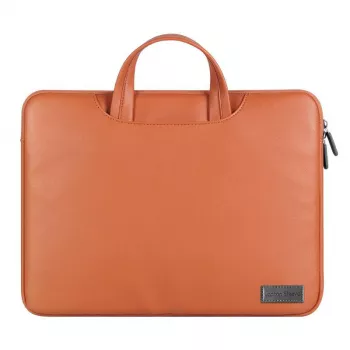
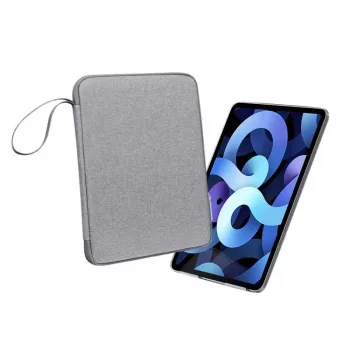
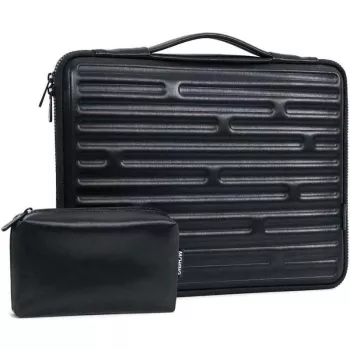
A protective sleeve should handle everyday bumps, fit the right MacBook size, and stay practical for commuting or flights. This shock-absorbing travel case is designed for MacBook Pro and MacBook Air models across common sizes, with a slim profile that’s easy to carry solo or slide into a backpack.
If you want a straightforward, minimal way to protect your laptop without switching to a bulky briefcase, the Laptop Sleeve Bag for MacBook Pro Air 13 14 15 16 Inch – Shockproof Travel Case is built for day-to-day carry, campus commutes, and travel days where your MacBook gets moved, set down, and packed repeatedly.
What This Sleeve Bag Is Made to Do
A MacBook sleeve earns its place when it solves three problems at once: protection, portability, and organization. This style of sleeve bag is made to support real routines—walking to class, heading to a coworking space, or navigating an airport with multiple stops.
- Protect a MacBook during commutes, campus days, and travel with padding that helps reduce impact from drops and knocks.
- Add a clean, minimal layer that fits into backpacks, totes, and carry-ons without bulk.
- Keep essentials together so the laptop, charger, and small accessories are easier to manage on the move.
The result is a setup that’s quick to grab, easy to slide into a larger bag, and still comfortable to carry on its own when you don’t need anything else.
Fit Guide for MacBook Pro & MacBook Air (13, 14, 15, 16 Inch)
Choosing the right size starts with your MacBook’s screen size, but it’s also smart to consider how you actually carry it. A sleeve that’s too tight can strain zippers and corners; a sleeve that’s too loose allows sliding, which increases the odds of edge impacts.
- Choose by the MacBook’s screen size and confirm the device generation if the model has a thicker profile or protective shell already installed.
- A good fit should zip smoothly without forcing corners, while still minimizing internal movement.
- If carrying a hard shell case on the MacBook, consider sizing up only if the shell noticeably increases thickness.
If you’re not sure which MacBook you have, Apple’s guide can help you identify the exact model before you buy: Apple Support: Identify your MacBook model.
Quick fit checklist
| MacBook size | Best for | Fit check before buying |
|---|---|---|
| 13 inch | MacBook Air/Pro compact carry | Confirm zipper clearance around corners and room for thin skins |
| 14 inch | Everyday carry with slightly larger footprint | Check if model has thicker base; avoid overly tight sleeves |
| 15 inch | Larger workspace on the go | Make sure sleeve dimensions match the model’s wider chassis |
| 16 inch | Travel and workstation setups | Verify backpack compartment size; ensure zipper path isn’t strained |
Shockproof Protection: What to Look For
“Shockproof” should mean more than just a thicker fabric. The most useful sleeves combine cushioning, a gentle interior, and strong construction in the places that take the most stress (edges, seams, and zipper track).
- Cushioned layers that help disperse impact around the laptop body rather than concentrating it at edges.
- Soft inner lining to reduce scuffs and micro-scratches during insertion and removal.
- Reinforced seams and zipper tracks to handle frequent open/close cycles while traveling.
For practical protection, focus on a sleeve that keeps the MacBook from shifting around inside while still zipping easily. That combination reduces the chance of corner dings when the bag gets set down quickly.
Travel-Friendly Details That Matter
Travel days introduce a different kind of wear: quick packing, constant handling, and tight spaces under seats or between other items in your carry-on. A slim sleeve is useful because it adds protection without forcing you to reorganize your whole bag.
- Slim profile to fit under an airline seat or inside a carry-on without stealing space from other gear.
- Easy-grip zipper pulls for quick access at security checks and gate changes.
- A practical layout that supports grab-and-go use from desk to meeting to airport.
For smoother airport screening, it helps to know the current laptop guidance for carry-on screening: TSA: What can I bring? (Laptops).
Care and Daily Use Tips
A sleeve lasts longer (and protects better) when it’s treated like part of your everyday system instead of an afterthought at the bottom of a bag.
Pair It With Small Apple Essentials
- Add a compact accessory organizer so small items don’t scratch the laptop or disappear into a backpack, like the Compact Storage Box for Apple Pencil Tips.
- Use a reliable charging cable for travel and desk setups to reduce wear on the original cable, such as the USB Type C to Lightning Fast Charging Cable for Apple iPhone 15/14/13/12.
- Protect earbuds with a separate case to prevent scuffs and keep them easy to find during commuting, like the Floral Luminous Silicone Case for Apple AirPods Pro.
When This Sleeve Bag Is the Right Choice
FAQ
Will a MacBook with a thin hard shell case still fit?
Often yes if the shell is slim, but it depends on how much thickness it adds at the corners. Check that the sleeve zips closed smoothly without pressing hard against edges.
Is a shockproof sleeve enough protection for air travel?
A padded sleeve helps with bumps and handling, but it works best inside a structured backpack or carry-on. Avoid checking it and keep the laptop away from heavy items that can press into the sleeve.
How should the sleeve fit—snug or loose?
Snug with smooth zipping is ideal. Too loose allows movement and corner impacts, while too tight can stress the zipper and seams over time.








Leave a comment